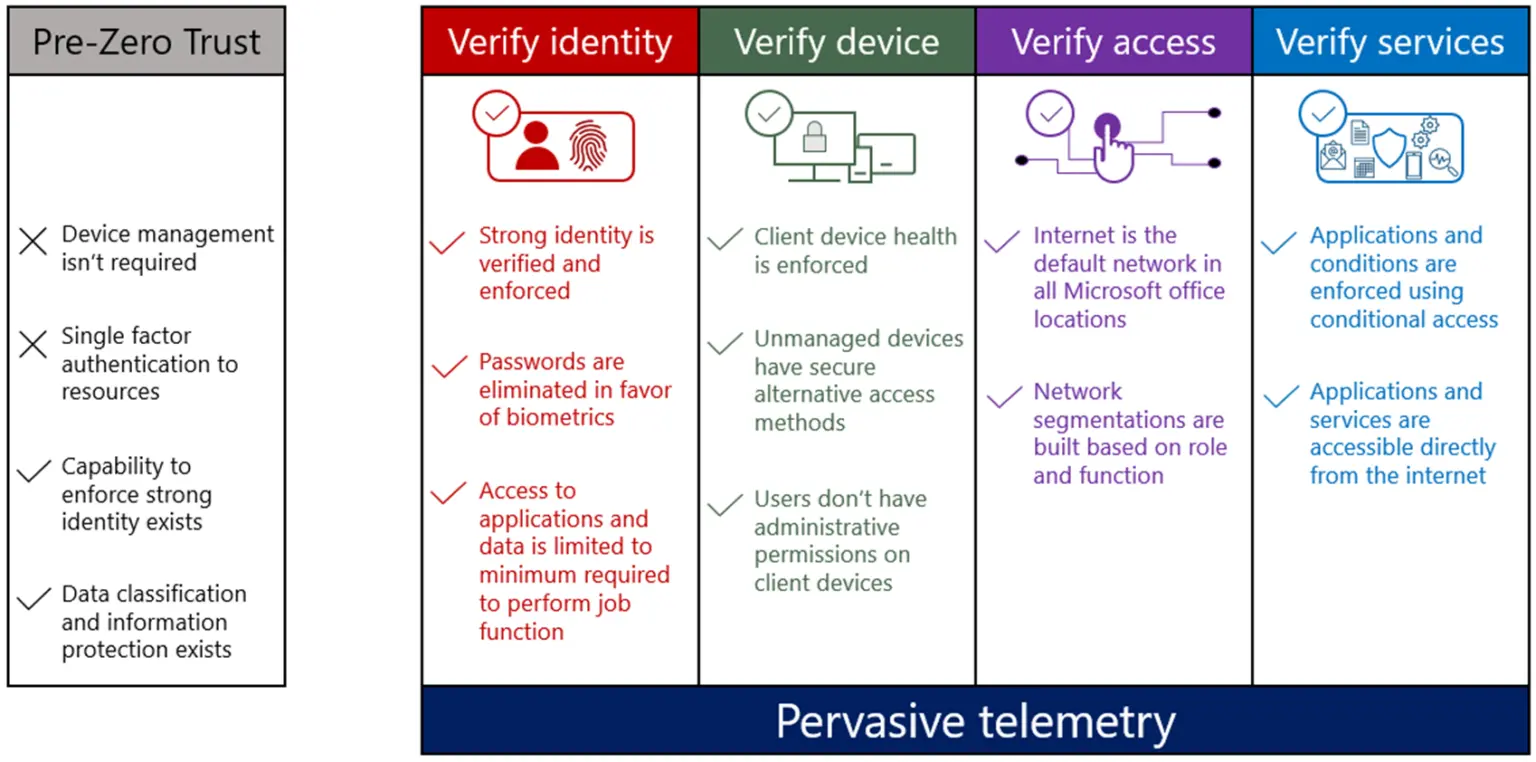
The traditional castle-and-moat approach to network security is failing. For decades, organizations relied on a strong perimeter to keep attackers out, but in an era of cloud computing, remote work, and sophisticated threats, this model is no longer sufficient. Once an attacker breaches the perimeter, they often have free rein to move laterally and access sensitive data. This is where the Zero Trust model comes in—a security framework built on the principle of “never trust, always verify.”
Microsoft’s own journey to implementing a Zero Trust architecture provides a powerful case study for any organization grappling with modern security challenges. By shifting from a perimeter-based model to an identity-centric one, they not only enhanced their security posture but also improved the user experience. This post breaks down their strategy into a practical, phased approach that offers valuable lessons for everyone.
The Painful Truths of Perimeter-Based Security
After analyzing thousands of security incidents, Microsoft’s security team uncovered four hard truths that many CISOs and security professionals often overlook. These realizations became the catalyst for their architectural transformation.
- Your network perimeter is a security theater. Relying solely on firewalls and VPNs creates a false sense of security. The reality is that the network perimeter is porous and cannot be the single line of defense.
- Admin accounts are the perfect attack vector. Standing administrative privileges are a goldmine for attackers. Once compromised, they provide extensive access to critical systems and data.
- Device compliance matters more than network location. A device connected to the corporate network isn’t inherently secure. Verifying device health and compliance in real-time is far more critical than simply knowing its location.
- Application and service access must be continuously verified. One-time authentication is not enough. Access should be continuously validated throughout a session based on real-time risk signals.
Microsoft’s Four-Phase Zero Trust Implementation
In response to these challenges, Microsoft developed a Zero Trust architecture that became the foundation of their security strategy. Their journey can be broken down into four distinct phases, creating a clear roadmap for implementation.

Phase 1: Identity Pivot
The first and most critical phase was to establish identity as the new security perimeter. The goal was to ensure that every user accessing corporate resources was strongly authenticated and their access was appropriate for the context.
- Eliminated password-only authentication: Moved towards more secure methods to reduce the risk of credential theft.
- Implemented phishing-resistant Multi-Factor Authentication (MFA): Deployed strong MFA for all users, including methods like biometrics and hardware tokens.
- Deployed risk-based Conditional Access policies: Used real-time signals to evaluate access requests. For example, access from an unfamiliar location or a non-compliant device would trigger additional verification steps or be blocked entirely.
Phase 2: Service & Application Validation
With strong identity controls in place, the focus shifted to ensuring that applications and services could validate identity and device health before granting access.
- Required apps to validate identity and device health: Integrated applications with the identity provider (like Azure AD) to enforce access policies.
- Applied continuous session monitoring: Monitored sessions for anomalous behavior and used adaptive controls to respond to changes in risk. For instance, if a user’s device becomes non-compliant mid-session, their access could be limited or terminated.
Phase 3: Device Health Assurance
A core tenant of Zero Trust is that no device is trusted by default. This phase focused on continuously assessing the health and compliance of every device accessing the network.
- Continuous device health assessment: Implemented tools to constantly monitor the security posture of endpoints.
- Real-time compliance checking: Verified that devices met security requirements before and during access.
- OS version, patch level, and EDR status verification: Enforced policies that required devices to be up-to-date with patches and have Endpoint Detection and Response (EDR) solutions active.
Phase 4: Least Privilege By Design
The final phase aimed to minimize the attack surface by eliminating unnecessary privileges and restricting access to the bare minimum required for a user to perform their job.
- Eliminated standing admin privileges: Removed persistent administrative rights, which are a primary target for attackers.
- Implemented Just-in-Time (JIT) access: Granted administrative privileges on-demand for a limited time and only for specific tasks.
- Limited session durations with automatic termination: Ensured that privileged sessions were automatically closed after a set period, reducing the window of opportunity for attackers.
Conclusion: Better Security and a Better User Experience
Perhaps the most surprising outcome of Microsoft’s Zero Trust transformation was that it actually improved the user experience. By moving away from cumbersome VPNs and providing seamless, secure access from any location or device, employees became more productive. The shift proved that robust security and user convenience are not mutually exclusive.
Zero Trust is not a product you can buy off the shelf; it’s an architectural philosophy and a journey of continuous improvement. Microsoft’s phased approach demonstrates that by focusing on identity, verifying devices, validating applications, and enforcing least privilege, any organization can build a more resilient and modern security foundation.
Disclaimer: The views expressed in this blog are my own, based on my knowledge, experience, and research. They don’t reflect my current or previous employers’ views.
Further Reading
- Microsoft Inside Track: Implementing a Zero Trust security model at Microsoft