
Executive summary
Enterprises are racing to adopt AI coding agents like Claude Code to accelerate development, improve code quality, and automate maintenance tasks. But running these agents directly on developer laptops or shared workstations quietly reshapes your threat model. You are no longer hardening a human with tools; you are giving a semi-autonomous process broad, continuous access to endpoints, credentials, and networks at machine speed.
On a typical enterprise laptop, an AI coding agent can execute shell commands, install packages, run arbitrary code, talk to your host Docker daemon, touch production-like data, and probe every file and credential within reach. Even if the model is benign and your vendor is trustworthy, this is still an avoidable expansion of attack surface. Misconfiguration, prompt injection, compromised dependencies, or simple agent mistakes can all turn that power into damage.
Docker Sandboxes provide a different pattern. Instead of letting agents run on the host, they execute inside lightweight microVMs with their own private Docker daemons, isolated networks, and explicit workspace sharing. Your agent still feels like it is “on your machine” — it sees the same file paths and can build and run containers — but it cannot touch your host Docker daemon, your localhost services, or other sandboxes. Network policies control where it can talk on the internet. When something goes wrong, you delete the sandbox and start fresh.
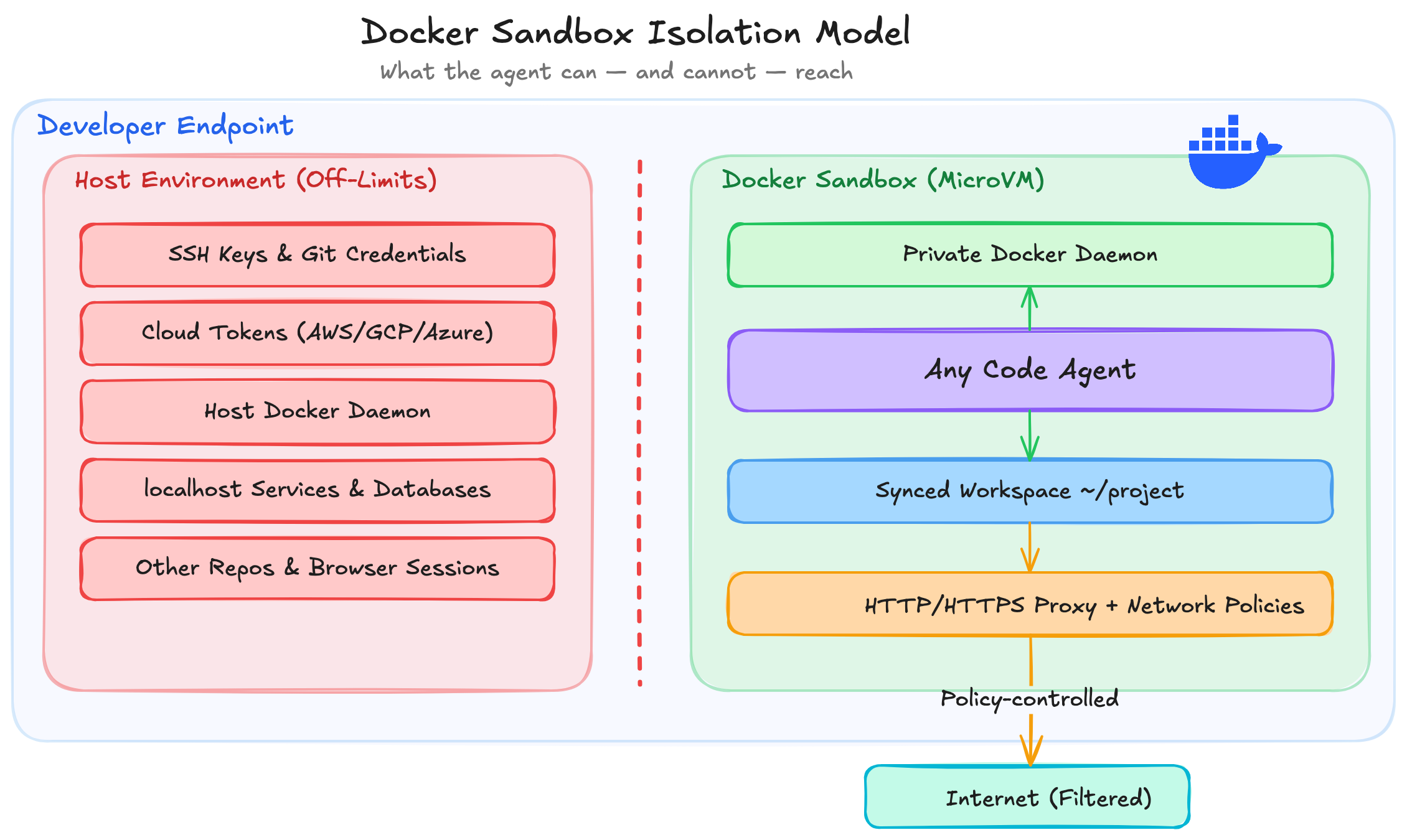
This article makes the security case for treating Docker Sandboxes as a first-class control for AI coding agents. It explains why endpoint execution is risky, how microVM-based sandboxes work, how to use them with Claude Code in practice, and how to make sandboxed execution the default for sensitive repositories. It closes with concrete governance guidance, a rollout maturity model, and a realistic view of current limitations so security leaders, platform engineers, and developer experience teams can make informed decisions.
Why direct agent execution on developer laptops is risky
From an enterprise perspective, “just run Claude Code on your laptop” collapses several trust boundaries that security teams have carefully built over years.
Endpoint compromise amplification
Human developers are already high-value targets. But a human still types one command at a time, makes sense of prompts, and occasionally pauses to think. An AI coding agent can:
- Execute dozens of shell commands in seconds
- Traverse entire repositories and configuration trees
- Spawn containers and background processes
- Rewrite large swaths of code or infrastructure
If an attacker gains influence over the agent (through prompt injection, malicious dependencies, or skill/tool compromise), the blast radius is immediately larger than a single mistyped rm -rf. The agent becomes a force multiplier for endpoint compromise.
Local credential and secret exposure
Developer endpoints are dense with credentials:
- SSH keys for Git and bastion hosts
- Cloud CLI tokens (AWS, GCP, Azure)
- Kubernetes kubeconfigs and contexts
- Git credentials and personal access tokens
- Package manager auth (npm, PyPI, private registries)
- Browser sessions and cookies
Running an agent directly on the host means it inherits the same environment variables, configuration files, and filesystem access that a developer has. Even if the agent never intentionally exfiltrates secrets, any vulnerability in its runtime, extensions, or dependencies can expose high-value credentials.
Shell, dependency, and script execution risk
Modern agents routinely:
- Install new system packages and language runtimes
- Run build and test scripts from
package.json,Makefile, or CI configs - Execute
docker build,docker compose, and arbitrary containers - Modify shell profiles, editor configs, and toolchains
On a bare endpoint, all of this happens directly against the host:
- A malicious or compromised dependency can gain full host access.
- An unsafe test script might wipe local state or connect to internal systems.
- A
docker runcan mount host directories or sockets with dangerous privileges.
Host Docker daemon and localhost exposure
Many agents need to build and run Docker containers as part of their workflow. On a laptop:
- Mounting
/var/run/docker.sockgives the agent control over the host Docker daemon. - The agent can see and interact with every container, image, and volume on the host.
- The agent can talk to sensitive services bound to
localhost(e.g., internal proxies, database tunnels, admin UIs).
This creates a powerful lateral movement path: compromise the agent, then pivot through Docker and localhost to reach internal services that were never meant to be accessible from an automated process.
“The developer approved it” is not a control
Finally, “the developer pressed Enter” is not a robust control model. Approving a single CLI command is not equivalent to understanding every side effect of a multi-step plan executed by an LLM:
- Developers cannot realistically audit every shell, network, and filesystem operation the agent performs.
- Many attacks (prompt injection, data exfiltration over benign domains) are invisible at the command level.
- The pressure to “just accept” suggestions in the name of productivity undermines manual review.
If you treat developer consent as your main protection, you are effectively delegating security review to the LLM and the busiest people in your organization.
What this looks like in practice
Consider a concrete scenario. A developer asks their AI coding agent to add a small feature to a Node.js service. The repo contains a package.json with a compromised postinstall hook buried in a transitive dependency. The agent runs npm install as part of its normal workflow. The malicious postinstall script executes silently and:
- Reads
~/.aws/credentialsand~/.ssh/id_ed25519. - Queries the AWS Instance Metadata Service at
169.254.169.254for IAM role credentials. - Base64-encodes everything and POSTs it to a benign-looking analytics domain.
- Writes a reverse shell into
~/.bashrcfor persistence.
The agent never “intended” any of this. It just ran npm install — the same command a human would run. But because the agent runs on bare metal with the developer’s full environment, the blast radius is the developer’s entire credential set, cloud access, and SSH trust chain. None of this is visible in the agent’s output or requires special prompting. It happens at dependency resolution time, before the agent writes a single line of application code.
In a Docker Sandbox, the same attack plays out very differently: ~/.aws/credentials and ~/.ssh don’t exist inside the VM, the IMDS probe hits a blocked private range, the exfiltration POST is denied by network policy, and ~/.bashrc persistence dies when the sandbox is deleted. The malicious dependency still runs, but it finds nothing to steal and nowhere to send it.
If you recognize any of these patterns, keep reading
Before moving to solutions, check whether your organization is doing any of the following:
- Letting agents run with the developer’s full shell environment and credentials on bare metal.
- Mounting the host Docker socket into agent containers to get Docker-in-Docker working.
- Granting broad cloud IAM roles to developer endpoints where agents also run.
- Treating agent prompts or per-command approval as a meaningful security boundary.
- Relying solely on code review to catch agent-induced misconfigurations or backdoors.
Each of these patterns assumes the agent will always behave as intended and never be influenced by malicious input or compromised dependencies. That is not a safe assumption in 2026.
Isolation as a first-class control for agentic tooling
Traditional developer tools are human-operated. They wait for input, execute a bounded action, and return control. Agentic tooling is different: it can plan, reason, and execute multi-step workflows, chaining tools and writing its own code. That shift breaks many existing assumptions about least privilege.
Human-operated tools vs autonomous agents
With human-operated tools:
- The human provides the context and intent.
- Tools are narrow and single-purpose.
- Side effects are generally visible to the operator.
With agents:
- The model infers intent from natural language and long-term context.
- It chooses which tools to call and in what order.
- It may run in the background or unattended, especially in “YOLO” / high-autonomy modes.
Once you grant an agent access to the full host environment, it is extremely difficult to reason about or constrain its behavior purely at the application layer.
Why containerization alone is not enough
At first glance, containers seem like a natural fit: put the agent into a container and you’re done. In practice, container-only isolation often breaks down:
- The agent still needs access to the host Docker daemon to build and run containers.
- Mounting the Docker socket (
/var/run/docker.sock) into the container hands it full control of the host Docker environment. - Containers on developer laptops typically share the same underlying VM and kernel (especially with Docker Desktop).
You end up with a “container” that is effectively part of the host’s trust domain, especially from the perspective of Docker and localhost access.
Why microVMs and separate trust boundaries matter
MicroVM-based sandboxes draw a much harder line:
- Each sandbox runs in its own VM with a dedicated kernel.
- The sandbox gets a private Docker daemon that is entirely separate from the host’s.
- Only the project workspace is synced into the sandbox at the same absolute path.
- Network access is mediated by a host-side HTTP/HTTPS proxy with explicit policies.
This creates a clear, enforceable trust boundary:
- The host OS and host Docker daemon are off-limits.
- Other sandboxes are invisible.
- Only the workspace and explicitly allowed network destinations are in scope.
From a security architecture perspective, you can reason about “what the agent can reach” in the same way you reason about any other VM or workload.
What Docker Sandboxes are
Docker describes Sandboxes as “disposable, isolated environments purpose-built for coding agents.” Concretely, a Docker Sandbox is:
- A lightweight microVM managed by Docker Desktop (macOS, Windows experimental)
- A private Docker daemon running inside that VM
- An agent container (for Claude Code or other supported agents) attached to that private daemon
- A synced workspace that mirrors a directory from your host at the same path
- A host-side HTTP/HTTPS proxy that applies network policies and injects API credentials
Agents inside a sandbox:
- Can build images and run containers using the private daemon.
- See only the containers and images they create.
- Cannot see or control the host Docker daemon.
- Cannot talk to your host’s
localhostor other sandboxes by default.
From the developer’s point of view, you still run a single CLI command like:
docker sandbox run claude ~/my-project
But from a security point of view, you have moved the agent into a controlled, auditable environment with an explicit perimeter.
How Docker Sandboxes work under the hood
At a high level, Docker Sandboxes compose a few building blocks:
- Docker Desktop on the host
- A microVM per sandbox
- A private Docker daemon per sandbox
- An agent container per sandbox
- Bidirectional workspace syncing
- An HTTP/HTTPS filtering proxy with network policies and credential injection
Architecture overview
Conceptually, the architecture looks like this:
  flowchart LR
  devLaptop["Developer Laptop"] --> dockerDesktop["Docker Desktop"]
  dockerDesktop --> sandboxVM["Sandbox MicroVM"]
  sandboxVM --> sandboxDaemon["Private Docker Daemon"]
  sandboxVM --> claudeAgent["Claude Code Agent Container"]
  devWorkspace["Workspace (/Users/you/app)"] <-->|Sync| sandboxWorkspace["Sandbox Workspace (Same Path)"]
  sandboxVM -.->|Outbound traffic| httpProxy["HTTP/HTTPS Proxy + Network Policies"]
  httpProxy --> internet["External APIs & Package Repos"]
And in a more enterprise-friendly block view (matching Docker’s documentation):
Host Endpoint
   |
Docker Desktop
   |
MicroVM Sandbox
   |--- Private Docker daemon
   |--- Claude Code agent
   |--- Runtime tools
   |
Synced workspace only
MicroVM isolation and private Docker daemons
Per the architecture docs:
- On macOS, sandboxes use Apple’s
virtualization.framework. - On Windows (experimental), they use Hyper-V.
- Each sandbox VM runs its own Docker daemon.
- Agents invoke
docker build,docker compose, anddocker runagainst that private daemon.
Critically:
- The sandbox daemon has no access to host containers or images.
- Sandboxes cannot reach each other’s daemons or containers.
- Deleting a sandbox (
docker sandbox rm) deletes the VM, daemon state, images, and any packages installed inside the VM.
Workspace syncing and path preservation
The workspace directory is synced, not mounted, into the sandbox:
- The sandbox workspace appears at the same absolute path as on the host (for example,
/Users/alice/projects/myapp). - File changes sync both ways: edits from the host show up in the sandbox; agent changes propagate back.
- Paths in error messages and logs line up between host and sandbox.
This design gives you the ergonomics of “the agent is working on my local files” with the safety of “everything else stays inside the VM.”
Networking, proxy, and credential injection
For outbound HTTP/HTTPS, each sandbox uses a host-side proxy available at host.docker.internal:3128. The network policies docs highlight:
- The default policy mode is
allow(permit all traffic, block private ranges andlocalhost). - Policies can operate in allowlist mode (
--policy allow— permit all, block specific destinations) or denylist mode (--policy deny— block all, allow only listed hosts). - You can allow or block specific hosts, wildcard domains, port-specific patterns, or CIDR ranges.
- Non-HTTP/HTTPS traffic (raw TCP, UDP) is blocked entirely — all agent communication must go through the HTTP proxy or stay within the sandbox.
The same proxy also handles credential injection for supported providers (architecture):
- You set API keys on the host (for example,
ANTHROPIC_API_KEY,OPENAI_API_KEY,GOOGLE_API_KEY, or GitHub tokens). - The proxy intercepts outbound requests to those services and injects the appropriate authentication headers transparently.
- Actual credentials never live inside the sandbox disk image — the agent makes requests without credentials, and the proxy adds them.
- For multi-provider agents (OpenCode, Docker Agent), the proxy automatically selects the correct credentials based on the API endpoint being called.
The proxy operates as a MITM (man-in-the-middle) for HTTPS, terminating TLS and re-encrypting traffic with its own CA certificate (trusted by the sandbox). This enables both credential injection and domain-level policy enforcement. For applications that use certificate pinning, a --bypass-host mode tunnels traffic directly without inspection.
From a security standpoint, this is powerful: you can rotate or revoke API keys at the host level while knowing they were never written into sandbox disk state.
Supported agents
While this article uses Claude Code as the primary example, Docker Sandboxes support a growing list of agents. All share the same microVM isolation model, private Docker daemons, network policies, and proxy-based credential injection. Your governance model can be agent-agnostic.
| Agent | Command | Auth method | Notes |
|---|---|---|---|
| Claude Code | claude | ANTHROPIC_API_KEY or subscription login | Most tested implementation |
| Codex (OpenAI) | codex | OPENAI_API_KEY | OpenAI’s coding agent |
| Copilot (GitHub) | copilot | GitHub auth | GitHub Copilot agent |
| Gemini (Google) | gemini | GOOGLE_API_KEY or OAuth | Google’s Gemini agent |
| Docker Agent | cagent | Multi-provider (proxy-managed) | Docker’s own multi-provider agent |
| Kiro (AWS) | kiro | Device flow auth | Interactive agent |
| OpenCode | opencode | Multi-provider (proxy-managed) | Open-source multi-provider agent with TUI |
| Custom shell | shell | N/A | Minimal sandbox for manual agent installation |
How to use Docker Sandboxes with Claude Code
Docker’s Claude Code sandbox guide and Get started guide give you the basic workflow. Here’s a consolidated, enterprise-ready version.
Prerequisites
- macOS or Windows (experimental) with Docker Desktop 4.58 or later
- An Anthropic API key or an active Anthropic subscription (Claude Pro / Max / Team / Enterprise)
- Sufficient disk space for sandbox VMs and images
You do not need Claude Code installed locally — Docker Sandboxes pulls its own template image (docker/sandbox-templates:claude-code) that includes the agent. This also means the sandbox always runs a known, consistent agent version.
For production-like environments, also ensure:
- Endpoint EDR is deployed and aware of Docker Desktop processes.
- Network egress from developer endpoints is governed by your standard controls.
Authentication setup
Docker Sandboxes supports two authentication models:
Option A: API key via environment variable (recommended for enterprises)
# ~/.zshrc or ~/.bashrc
export ANTHROPIC_API_KEY="sk-ant-api03-xxxxxxxx"
Because sandboxes use a background daemon process, inline environment variables (for example, ANTHROPIC_API_KEY=... docker sandbox run ...) will not be picked up reliably. Instead:
- Add the key to your shell config.
- Source your shell config in your terminal session.
- Restart Docker Desktop so the daemon sees the updated environment.
With this approach, the key is never stored inside the sandbox VM (the proxy handles credential injection as described above). This is the most secure option and the one you should standardize on.
Option B: Subscription-based interactive authentication
If you have an Anthropic subscription (Claude Pro, Max, Team, or Enterprise plan), you can authenticate interactively when Claude Code starts, or manually via the /login command inside the sandbox. This uses your Anthropic account subscription rather than a pay-per-token API key.
Be aware of the security tradeoffs:
- Interactive credentials are stored inside the sandbox where the agent can read them directly. This creates a risk of credential exfiltration if the agent is compromised.
- Must be repeated per sandbox — credentials do not persist if you destroy and recreate.
- Harder to manage, rotate, and audit centrally.
For enterprise deployments, prefer the API key approach with centralized key management. Use interactive auth only for individual experimentation or when API key provisioning is not yet available.
Security note: Claude Code launches with
--dangerously-skip-permissionsby default inside sandboxes. This enables full autonomy (YOLO mode) — the agent does not prompt for confirmation before running commands. This is the intended design: the microVM boundary is the security control, not per-command approval. However, you should be aware of this when evaluating the risk model.
Create and run your first sandbox
From your project directory:
cd ~/my-project
docker sandbox run claude
or explicitly:
docker sandbox run claude ~/my-project
On first run, Docker will:
- Create a sandbox (microVM, private daemon, and agent container).
- Pull the Claude Code sandbox template image (
docker/sandbox-templates:claude-code).
The docker sandbox run command is idempotent: running the same command again reuses the existing sandbox rather than creating a new one. Installed packages, Docker images, and agent state all persist.
Here is what that looks like in practice:
▶ Creating a Docker Sandbox for Claude Code
You can also mount multiple workspaces, with optional read-only mounts:
docker sandbox run claude \
  ~/my-project \
  ~/shared-docs:ro
This is useful for scenarios where the agent needs to reference docs or examples but must not modify them.
Managing sandboxes
List sandboxes
docker sandbox lsThis shows sandbox names, agent type, status, and workspace paths. Note that sandboxes do not appear in
docker pson the host — they are microVMs, not containers.Exec into a sandbox
docker sandbox exec -it <sandbox-name> bashThis gives you an interactive shell inside the agent container in the sandbox — ideal for debugging, inspecting installed tools, or running one-off commands.
Remove a sandbox
docker sandbox rm <sandbox-name>Removing a sandbox deletes:
- The VM
- The sandbox’s private Docker daemon state
- All images, containers, and packages inside
Your workspace files persist on the host; only sandbox-local state is discarded.
Recreate a sandbox
docker sandbox rm <sandbox-name>
docker sandbox run claude [PATH]
Use this when you want a clean environment — for example, after an experiment-heavy session or when troubleshooting odd behavior.
Here is a full walkthrough — listing sandboxes, exec-ing into one to inspect its private Docker daemon, proving the host cannot see sandbox containers, and cleaning up:
▶ Managing Docker Sandboxes — Isolation in Action
Network policies examples
You can tighten the defaults significantly for high-risk workflows. For example, restrict an agent to only AI APIs and package managers:
docker sandbox network proxy my-sandbox \
  --policy deny \
  --allow-host api.anthropic.com \
  --allow-host "*.npmjs.org" \
  --allow-host "*.pypi.org" \
  --allow-host github.com \
  --allow-host "*.githubusercontent.com"
To inspect what your agents are actually doing on the network:
docker sandbox network log
This surfaces allowed and blocked hosts, rule matches, and last-seen times — invaluable when tuning policies or investigating suspicious behavior.
Watch what this looks like in practice. Pay attention to the blocked entries — an exfiltration attempt, an IMDS metadata probe (169.254.169.254), and a localhost reach. Without sandboxing, all three would have succeeded silently:
▶ Network Policies — Blocking Exfiltration, IMDS Probes, and Localhost Access
How Docker Sandboxes reduce enterprise risk
You can think of Docker Sandboxes as a way to map specific risks from “agent on host” to concrete technical controls.
Risk-to-control mapping
| Risk | Host execution (no sandbox) | Docker Sandbox mitigation |
|---|---|---|
| Host filesystem exposure | Agent can traverse entire home directory, config files, SSH keys, etc. | Only the workspace path is synced into the VM; no direct access to other host paths. |
| Host Docker daemon exposure | Agent can control all host containers, images, volumes via /var/run/docker.sock. | Agent talks only to the sandbox’s private daemon; host Docker socket is never exposed. |
| Access to localhost services | Agent can reach internal databases, admin UIs, proxies on localhost. | Default network policies block loopback and private network ranges; localhost services are unreachable. |
| Credential leakage risk | Secrets in env vars and dotfiles are directly readable by the agent process. | API keys live on the host; proxy injects credentials into outbound requests without storing them inside the VM. |
| Unrestricted outbound traffic | Agent can exfiltrate code and data to arbitrary domains. | Network policies allow/deny specific domains and CIDRs; suspicious destinations are easily blocked and logged. |
| Persistence of unsafe tooling | Installed packages and tools remain on the host after experiments. | Packages installed inside the sandbox are destroyed when the VM is removed; no residue on the host. |
| Cleanup complexity after mistakes | Rolling back host changes (files, configs, tools) is manual and error-prone. | Delete and recreate the sandbox to revert environment; workspace files remain under version control. |
| Lateral movement via containers | Compromise of one container can lead to control over Docker and other containers. | Sandboxes are isolated from each other and from the host daemon; compromise is contained within a single microVM. |
Execution model comparison
Adapted from the official architecture comparison:
| Approach | Isolation level | Docker access | Host impact | Recommended use case |
|---|---|---|---|---|
| Host execution | None | Full access to host daemon | Direct system impact | Manual development by trusted humans |
| Container + host Docker socket | Kernel namespaces only | Full access to host daemon | Agent sees all host containers | Trusted tools needing Docker CLI |
| Docker-in-Docker | Nested daemons in container | Private daemon, but complex | Moderate (privileged container) | CI/CD environments |
| Docker Sandboxes (microVMs) | Hypervisor-level | Private daemon per sandbox | No access to host containers | Autonomous agents building/running containers |
Practical enterprise deployment patterns
Moving to sandbox-by-default is less about technology and more about rollout strategy. Here are practical patterns that work in real organizations.
1. Individual developer opt-in
When to use: Early experimentation, small teams, or security-conscious champions.
- Provide a simple “opt-in” guide: how to install Docker Desktop, enable Sandboxes, and run Claude Code via
docker sandbox run. - Encourage developers to migrate their own workflows.
- Collect feedback on performance, DX, and edge cases.
2. Security-approved default for sensitive repos
When to use: You know which repositories are crown jewels (PCI, healthcare, secrets, critical infrastructure).
- Maintain a list or tag of “sensitive” repos.
- For those repos, prescribe a standard command, for example:
claudemust be invoked via a sandbox wrapper script. - CI/CD or pre-commit checks can detect direct host-based usage and warn or block.
3. Sandbox-by-default for AI agent workflows
When to use: You have broad agent adoption and want a consistent baseline.
- For all official agent tooling (Claude Code, Gemini CLI, Copilot agents, internal tools), publish:
- A standard sandboxed invocation.
- A recommended network policy profile.
- Example shell functions and wrapper scripts.
- Integrate these into golden images, devcontainers, and onboarding docs.
4. Regulated environments and PAWs
In regulated sectors (finance, healthcare, government), sandboxing fits naturally into Privileged Access Workstation (PAW) patterns:
- Treat Sandboxes as part of your PAW architecture for high-risk engineering activities.
- Combine with:
- Tight egress controls.
- Hardware-backed identity.
- Strong logging and session recording for sensitive operations.
5. Pairing with proxy, EDR, DLP, and logging
Sandboxes are not a replacement for existing controls — they are a leverage point:
- Use the sandbox network proxy as a choke point for AI-agent egress.
- Ensure EDR is tuned to observe Docker Desktop and sandbox processes.
- Route sandbox logs (network, process, filesystem events where available) into your SIEM.
- Use this telemetry to refine which policies are mandatory vs optional.
Making Claude Code run in Docker Sandbox by default
This section is about enforcement. How do you make “Claude runs in a sandbox” the normal path, while still being honest about bypass risk and developer ergonomics?
We’ll cover several patterns:
- Shell aliases
- Shell function wrappers
- Shim binaries earlier in
PATH - Repo-local helper scripts
- Devcontainer/bootstrap scripts
- MDM-managed profiles
- CI/CD checks
- Internal CLI / developer portal wrappers
Shell alias (soft guardrail)
Example (zsh/bash):
alias claude='docker sandbox run claude "$PWD" --'
The trailing -- is critical: it tells docker sandbox run that everything after it is an agent argument, not an extra workspace path. Without it, claude --continue would misparse --continue as a second workspace.
Pros:
- Trivial to adopt.
- No repo modifications required.
- Works across projects.
- Correctly forwards agent arguments (for example,
claude --continueorclaude -p "fix the bug").
Cons:
- Easy to bypass by calling the real
claudebinary (for example,/usr/local/bin/claude). - Hard to enforce centrally.
Best used: As a first step for individual developers or teams experimenting with sandboxed workflows.
Shell function wrapper (more control, context-aware)
claude() {
  local workspace="$PWD"

  if [ -f "$workspace/.sandbox-required" ]; then
    echo "[info] Running Claude Code in Docker Sandbox for $workspace"
    docker sandbox run claude "$workspace" -- "$@"
  else
    echo "[warn] Running Claude Code on host for $workspace (no .sandbox-required marker)"
    command claude "$@"
  fi
}
The function always uses $PWD for sandbox detection rather than consuming the first argument — claude’s arguments are flags like --continue and -p "prompt", not workspace paths. Both branches forward all arguments: the sandbox branch uses -- "$@" so arguments reach the agent inside the sandbox, and the host branch passes them directly.
Pros:
- Can enforce different behavior based on repo metadata.
- Can log or warn when host execution is used.
- Correctly forwards all agent arguments in both code paths.
Cons:
- Still bypassable (
command claude, full path, alternative shells). - Requires consistent distribution of the wrapper function.
Best used: As a stepping stone toward stricter enforcement; good for orgs piloting sandbox requirements for specific repos.
Shim binary earlier in PATH (harder to bypass)
Create a small wrapper script named claude in a directory that appears before the real binary in PATH, for example /opt/company/bin/claude:
#!/usr/bin/env bash

set -euo pipefail

workspace="${PWD}"

if [ -f "$workspace/.sandbox-required" ]; then
  echo "[company] Running Claude Code via Docker Sandbox for $workspace"
  exec docker sandbox run claude "$workspace" -- "$@"
else
  echo "[company] Running Claude Code directly on host (no .sandbox-required marker)"
  exec /usr/local/bin/claude "$@"
fi
Pros:
- Much harder to bypass accidentally.
- Centralized place to evolve policy logic.
Cons:
- Still bypassable intentionally by specifying the real path.
- Must be coordinated with OS packaging and updates.
Best used: When you want a strong default across managed endpoints, especially when combined with MDM and endpoint configuration.
Repo-local helper script
In each repo, provide a standard entrypoint script (for example, ./tools/claude-sandbox.sh):
#!/usr/bin/env bash
set -euo pipefail

ROOT_DIR="$(cd "$(dirname "${BASH_SOURCE[0]}")/.." && pwd)"

docker sandbox run claude "$ROOT_DIR" -- "$@"
Teams then run:
./tools/claude-sandbox.sh
Pros:
- Explicit and discoverable per repo.
- Easy to enforce in CI/CD (“use the helper script, not raw
claude”).
Cons:
- Requires per-repo maintenance.
- Developers may still call the global CLI directly.
Best used: For high-value repos where you can enforce local workflows (for example, internal platforms, shared services).
Devcontainer / bootstrap script integration
If you use Dev Containers or bootstrap scripts:
- Bake sandboxed agent usage into those environments.
- For example, your devcontainer entrypoint can:
- Detect Docker Sandboxes availability.
- Prefer sandboxed Claude Code execution.
This concentrates complexity into the environment definition rather than per-developer shell config.
MDM / endpoint management deployment
For managed laptops:
- Use MDM to:
- Install the shim binary in a controlled path.
- Manage shell profiles that include sandbox wrappers.
- Configure Docker Desktop (version, settings, policy).
This shifts sandbox enforcement from “best effort” to “standard baseline,” similar to how you manage VPNs or endpoint firewalls.
CI/CD checks for protected repos
Finally, you can detect and discourage direct host usage for protected repos:
- Add a CI step that scans commit metadata, tooling config, or logs for evidence of direct agent execution on host.
- For example, if your policy is “all Claude Code usage on
payments-servicemust be sandboxed,” you can:- Require commits to include a marker that they were generated/assisted from a sandboxed environment.
- Or, more realistically, treat “non-sandbox usage” as a documented exception requiring approval.
This is less about perfect enforcement and more about governance visibility.
Governance and policy recommendations
Technology without policy quickly drifts. Here is a concrete starting point for an enterprise policy around coding agents and sandboxes.
Recommended standard
Policy statement (high level)
All autonomous or semi-autonomous AI coding agents must execute in isolated environments that prevent direct access to host operating systems, host Docker daemons, and internal networks, except where explicitly approved as a risk exception.
When sandboxing should be mandatory
Sandboxing should be required for:
- Repositories that handle:
- Customer data
- Payment flows
- Authentication and authorization logic
- Secrets management or key material
- Regulatory scope systems (PCI, HIPAA, SOX, etc.)
- Any workflow that:
- Runs unattended agent sessions.
- Performs large-scale refactors or automated migrations.
- Interacts with production-like credentials or data.
Exceptions process
- Define who can approve:
- Direct host execution for a given repo.
- Non-standard agent configurations.
- Require:
- Documented rationale.
- Time-bounded approvals.
- Compensating controls (for example, restricted credentials, tighter EDR rules).
Telemetry and compliance
- Track:
- Which sandboxes exist (
docker sandbox lsoutput, exported centrally). - Which network policies are applied to each sandbox.
- Which agents and templates are in use.
- Which sandboxes exist (
- Periodically review:
- Sandbox network logs for exfiltration patterns.
- Endpoint configurations to ensure sandbox tooling remains present and enabled.
Example policy snippet
ai_coding_agents:
  default_execution_model: "sandbox"
  sandbox_implementation: "Docker Sandboxes (microVM-based)"
  mandatory_for_repos:
    - "payments/*"
    - "identity/*"
    - "infra/secrets*"
    - "prod-config/*"
  allowed_host_exceptions:
    - repo: "internal-scratchpad"
      owner: "devx-team"
      expires: "2026-12-31"
      rationale: "Low-risk experimentation only; no customer data."
  network_policies:
    high_sensitivity:
      mode: "deny"
      allow_hosts:
        - "api.anthropic.com"
        - "*.npmjs.org"
        - "*.pypi.org"
        - "github.com"
        - "*.githubusercontent.com"
Honest limitations and tradeoffs
No control is free. Docker Sandboxes today have real limitations you should plan around.
Platform and maturity constraints
- MicroVM-based Sandboxes are currently macOS and Windows (experimental) only (docs).
- Linux users may need to rely on legacy container-based sandboxes with weaker isolation.
- The ecosystem is evolving quickly; APIs and behaviors may change between Docker Desktop releases.
Performance and resource overhead
- Each sandbox is a VM plus a Docker daemon plus agent containers.
- Heavy workflows (large builds, many containers) can consume significant CPU, RAM, and disk.
- First-run latency is higher than direct host execution due to VM initialization and image pulls.
Workflow friction
- Developers must learn:
- New commands (
docker sandbox ...). - New mental models for where code is executing.
- How to debug inside a sandbox.
- New commands (
- Some existing scripts and tooling may assume host-level access to Docker and localhost.
Enforcement is not perfect
- Shell aliases and wrappers are always bypassable by determined users.
- Even with shims and MDM, there are edge cases (custom shells, non-standard setups).
- Sandboxes significantly reduce risk, but they are guardrails, not a complete, non-bypassable confinement system.
The right framing for leadership is:
- Sandboxes move you from “agents are running with full host privileges” to “agents are running inside dedicated, controlled environments.”
- You should still apply least-privilege credentials, strong logging, and good hygiene — but your failure modes become far more manageable.
Rollout maturity model
Here is a pragmatic, four-phase maturity model for adopting Docker Sandboxes for AI coding agents.
Phase 1: Ad-hoc pilots (Weeks 1–2)
- Enable Docker Sandboxes for a few volunteer teams.
- Document basic workflows for Claude Code in a sandbox.
- Collect performance, usability, and integration feedback.
Phase 2: Guardrails for crown jewels (Weeks 3–6)
- Identify top-tier sensitive repos.
- Introduce:
- Repo-local helper scripts.
- Shell wrappers that force sandbox usage when
.sandbox-requiredis present.
- Draft and socialize the initial policy.
Phase 3: Default sandboxed workflows (Months 2–4)
- Roll out shim binaries via MDM for managed endpoints.
- Update official engineering docs to use sandboxed commands by default.
- Integrate sandbox usage into devcontainers, bootstrap scripts, and starter templates.
Phase 4: Policy and telemetry integration (Months 4+)
- Enforce policy for high-risk repos.
- Ingest sandbox network logs and metadata into your SIEM.
- Periodically review:
- Exceptions.
- Policy drift.
- Emerging best practices from vendors and peers.
Quick start for engineers
For engineers who just want the shortest path to “safer Claude Code”:
Install or update Docker Desktop to 4.58+ and enable Sandboxes.
Set your Anthropic API key in your shell config:
export ANTHROPIC_API_KEY="sk-ant-api03-xxxxxxxx"From your project directory, run:
docker sandbox run claudeOptionally, add a simple alias:
alias claude='docker sandbox run claude "$PWD" --'When you’re done with an experiment-heavy session:
docker sandbox ls
docker sandbox rm <sandbox-name>
This gets you most of the safety benefits with minimal friction.
The entire flow, from version check to cleanup, in one terminal session:
▶ Quick Start — Sandboxed Claude Code in 60 Seconds
Conclusion
AI coding agents like Claude Code are becoming core parts of software delivery. They are also new, powerful, and imperfectly understood execution environments sitting on top of your most privileged endpoints. Treating them as “just another CLI tool” running directly on developer laptops is misaligned with modern enterprise threat models.
Docker Sandboxes offer a practical, developer-friendly way to regain control: microVM-based isolation, private Docker daemons, explicit workspace sharing, network policies, and host-side credential handling. They let you run agents with the autonomy they need to be useful, while sharply limiting what they can harm.
For security leaders and platform teams, the path forward is clear:
- Make sandboxed execution the default for high-value repos and AI-heavy workflows.
- Combine sandboxes with strong identity, network, and observability controls.
- Treat direct host execution as an exception that demands explicit approval, not the norm.
- Invest in the supporting infrastructure: MDM-managed endpoints, centrally rotated API keys, corporate proxy integration for sandbox egress, and sandbox telemetry flowing into your SIEM.
- Periodically red-team agent-based attack chains to validate that your sandbox policies hold under adversarial conditions.
The organizations that take this seriously now will be the ones who enjoy the productivity advantages of agentic tooling without inheriting unnecessary, invisible risk on every developer laptop.
References
- Docker documentation. Docker Sandboxes. https://docs.docker.com/ai/sandboxes/
- Docker documentation. Supported agents. https://docs.docker.com/ai/sandboxes/agents/
- Docker documentation. Claude Code sandbox. https://docs.docker.com/ai/sandboxes/agents/claude-code/
- Docker documentation. Get started with Docker Sandboxes. https://docs.docker.com/ai/sandboxes/get-started/
- Docker documentation. Docker Sandboxes Architecture. https://docs.docker.com/ai/sandboxes/architecture/
- Docker documentation. Network policies. https://docs.docker.com/ai/sandboxes/network-policies/
- Docker documentation. Using sandboxes effectively. https://docs.docker.com/ai/sandboxes/workflows/
- Docker Blog. Docker Sandboxes: Run Claude Code and Other Coding Agents Unsupervised (but Safely). https://www.docker.com/blog/docker-sandboxes-run-claude-code-and-other-coding-agents-unsupervised-but-safely/